How to Create Reusable AI Characters in Claude and ChatGPT
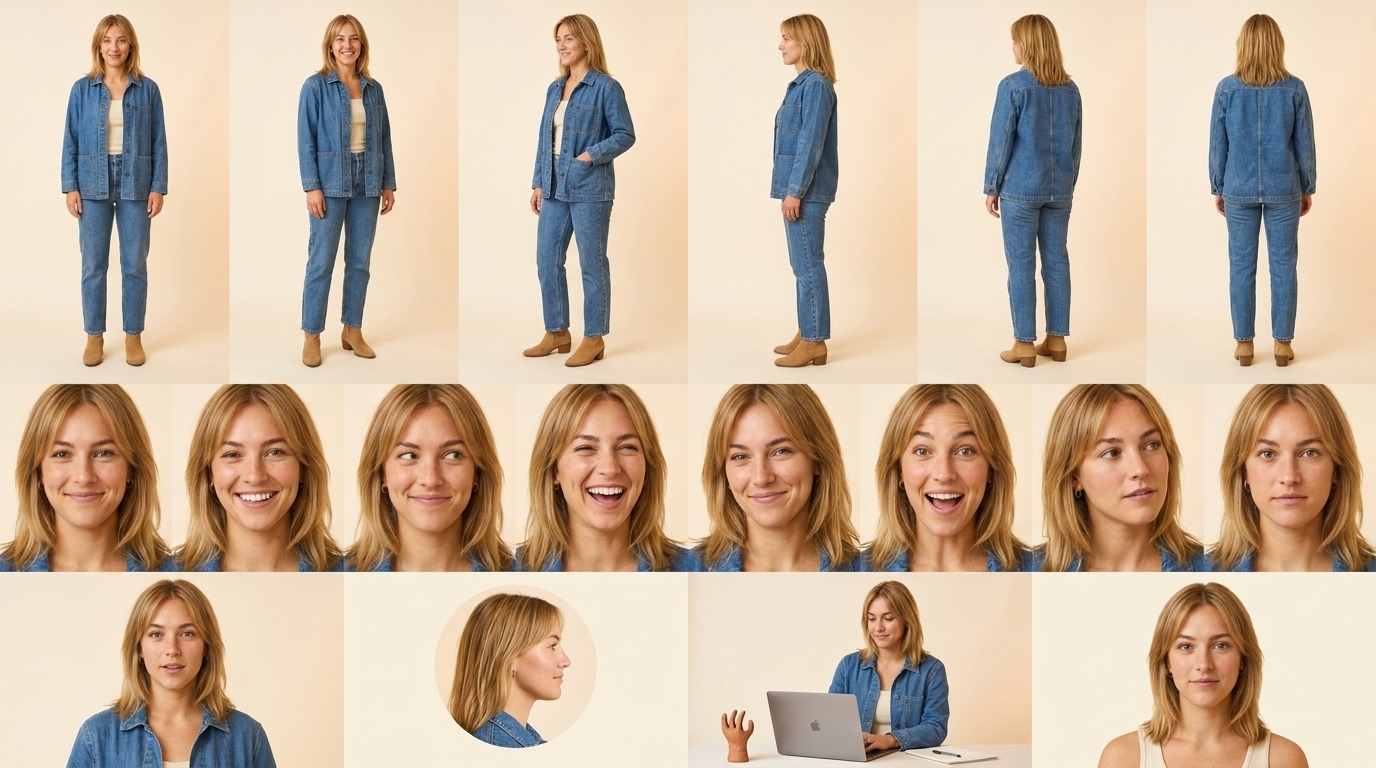
Reusable AI characters let you create one approved person, founder, creator, mascot, or spokesperson, then bring that same character into every campaign asset. With CreativeClaw, Claude or ChatGPT can keep the same face, wardrobe, visual style, and optional voice across portraits, product shots, social posts, talking-head clips, and standalone voiceovers.
That matters because most AI media workflows restart from scratch every time. A Character Kit gives the assistant a reusable identity to reference instead of guessing the person again on every prompt.
What a Character Kit includes
A strong Character Kit has five parts:
- Identity board: approved face, hair, outfit, body type, angles, expressions, and production crops.
- Character description: role, personality, speaking style, audience, and what must never change.
- Image style: lighting, lens feel, framing, color palette, and brand-safe visual direction.
- Video-ready portrait: a clean front-facing frame for talking-head clips and avatar video.
- Optional voice: a selected library voice or cloned voice that can be reused in audio and video.
The board is the visual anchor. The voice is the audio anchor. When both are approved, Claude or ChatGPT can pass the same reference image and voice into new generations, so a new asset does not start from scratch.
Why use CreativeClaw for reusable AI characters?
CreativeClaw is the fastest and simplest way to use reusable AI characters in Claude. Here's why:
- No API keys needed - No accounts, no configuration files. Connect one URL and every model is available instantly.
- No subscriptions - Pay only for what you generate. $10 = 1,000 credits. No monthly fees, credits never expire.
- MCP Apps - Preview generated media directly in Claude's UI. See results inline without opening files or navigating to external URLs.
- Expert skills built in - CreativeClaw knows how to get the best results from reusable AI characters. You don't need to be a prompt engineering expert - Claude handles the optimization.
- Let Claude iterate - This is the real power. Claude generates, evaluates the result, refines the prompt, and regenerates - all in one conversation. Your AI agent becomes your creative director.
- Run from anywhere - CreativeClaw is a remote MCP server. Use it from Claude Code, Claude Desktop, Claude Web, or OpenClaw - same results, same account, wherever you work.
How to create one in Claude
Step 1: Connect CreativeClaw. Use the setup guide to add CreativeClaw to Claude Desktop, Claude Code, or another MCP client.
Step 2: Describe the character. Start with practical details that can be reused visually:
Create a reusable Character Kit for Madison Claw, a fictional denim creator
for CreativeClaw.

Madison is an original adult woman with honey-blonde layered hair,
green-hazel eyes, light freckles, a dimpled smile, and a relaxed confident
style. Keep her in a medium-wash denim chore jacket, cream ribbed tank,
straight-leg jeans, small gold hoops, a thin necklace, and tan ankle boots.

Make the identity premium, realistic, casual, and brand-safe. Do not base
her on a real person or celebrity.
Step 3: Generate the character board. Ask for a single high-resolution image with full-body angles, close-up expressions, and production crops.
Generate one 16:9 character board for Madison Claw.

Include:
- 6 full-body angles: front, three-quarter left, three-quarter right, side,
  back three-quarter, and back.
- 8 close-up expressions: relaxed smile, bright grin, raised eyebrow,
  laughing, confident smirk, delighted surprise, thoughtful listening,
  and neutral direct camera.
- 4 production crops: talking-head frame, avatar crop, campaign still,
  and clean portrait crop.

Use consistent studio lighting, the same outfit, the same face, and no text
labels inside the image.
Step 4: Save the approved image as a Character. The approved board becomes the reference image for new portraits, social graphics, video frames, and cutouts.
Step 5: Add a voice if the character will speak. Pick a voice from the library or clone a voice with consent. Then generate a short sample with natural direction.
Generate a 12-second ElevenLabs voice sample for Madison.

Use the approved voice ID. Keep the delivery conversational and lightly
amused, not like an ad read. Include natural pauses and a small chuckle.

Line:
[chuckles] Everyone keeps telling Madison she has great jeans.
[pause] She prefers great Claws. [smiles]
Pick a voice from the library, clone your own, then keep the same character
speaking across every image, video, and campaign.
How to create one in ChatGPT
The ChatGPT flow is the same: connect CreativeClaw, create the character board, approve it, add an optional voice, then reuse the kit across media.
Use this prompt:
Use CreativeClaw to create a reusable Character Kit for our brand.
First generate and save the approved character board. After I approve it,
create:
1. a founder or creator portrait,
2. a cutout with the background removed,
3. a campaign still,
4. a talking-head video frame,
5. a reusable voice sample.

Keep the same face, outfit, camera realism, and brand style across every
asset. Use the same voice whenever the character speaks.
For video, pass the approved image and generated voice into the avatar video model:
Create a talking-head video using the approved Madison Claw portrait and
the approved voice sample. Keep Madison centered, realistic, and
conversational. Do not change her face, outfit, or voice.
How the image and voice get reused
When you ask for a new asset, Claude or ChatGPT should include the Character Kit reference. For images, the board or approved crop is passed as the visual reference. For video, the portrait is used as the avatar frame. For spoken media, the approved voice ID or cloned voice is reused.
That lets the assistant change the scene, crop, background, format, or script while keeping the character stable.
Keep these details locked:
- face shape, age, hair, and signature accessories
- outfit, color palette, and wardrobe silhouette
- camera realism, lens feel, and lighting direction
- voice ID, pace, accent, and emotional range
Let these details change:
- background and environment
- pose and camera angle
- asset format
- script and campaign message
Voice tips for more human delivery
When generating audio, write direction like a producer:
- Add pauses where a real speaker would think.
- Use tags such as
[chuckles],[laughs],[sighs], or[softly]only when they support the line. - Avoid overly polished ad reads. Ask for “conversational,” “lightly amused,” or “founder talking to a customer.”
- Reuse the same voice ID for standalone audio and talking-head video.
CreativeClaw supports ElevenLabs and other text-to-speech models, so you can use a library voice, clone a voice with consent, or test several voices before locking the Character Kit. For a deeper voice workflow, read How to Use ElevenLabs in Claude or Text to Speech in ChatGPT.
Example reusable campaign prompt
Use the Madison Claw Character Kit.

Create three assets for the "Great jeans. Better Claws." campaign:
1. a LinkedIn creator portrait,
2. a 16:9 talking-head video intro,
3. a square campaign still for paid social.

Keep the same face, honey-blonde hair, denim outfit, gold hoops, relaxed
delivery, and approved voice. The scene can change, but the character
identity cannot.
When to use Character Kits
Character Kits are useful when a campaign needs the same human presence across many formats:
- founder-led product launches
- creator ads and UGC-style concepts
- cloned-yourself demos with consent
- brand mascots and spokespeople
- course instructors and explainers
- product onboarding videos
- sales sequences and personalized outreach
They pair especially well with image generation in Claude, video generation in Claude, and video generation in ChatGPT.
Get started
- Connect CreativeClaw.
- Ask Claude or ChatGPT to create a Character Kit.
- Approve the character board.
- Add an optional voice.
- Generate image, video, cutout, and voice assets from the same saved character.
Setup by client
Claude Code - Install the CreativeClaw plugin for the full experience with skills and optimized prompts. See setup guide.
Claude Desktop (Cowork) - Add the CreativeClaw MCP URL in your MCP server settings.
Claude Web (claude.ai) - Add CreativeClaw as a remote MCP server in your MCP settings. The plugin with advanced skills is coming soon, but the MCP tools work today.
OpenClaw - Add CreativeClaw as an MCP server in your configuration.