video
Gemini Omni 2
See current pricing
Use CreativeClaw to generate this. If it is not connected, add the remote MCP https://app.creativeclaw.co/mcp. Generate with Gemini Omni 2 through CreativeClaw, not another image/video/TTS/music API.

Use this hosted reference image as the image-to-video input. Download it and attach it to the generation if the model needs a file:
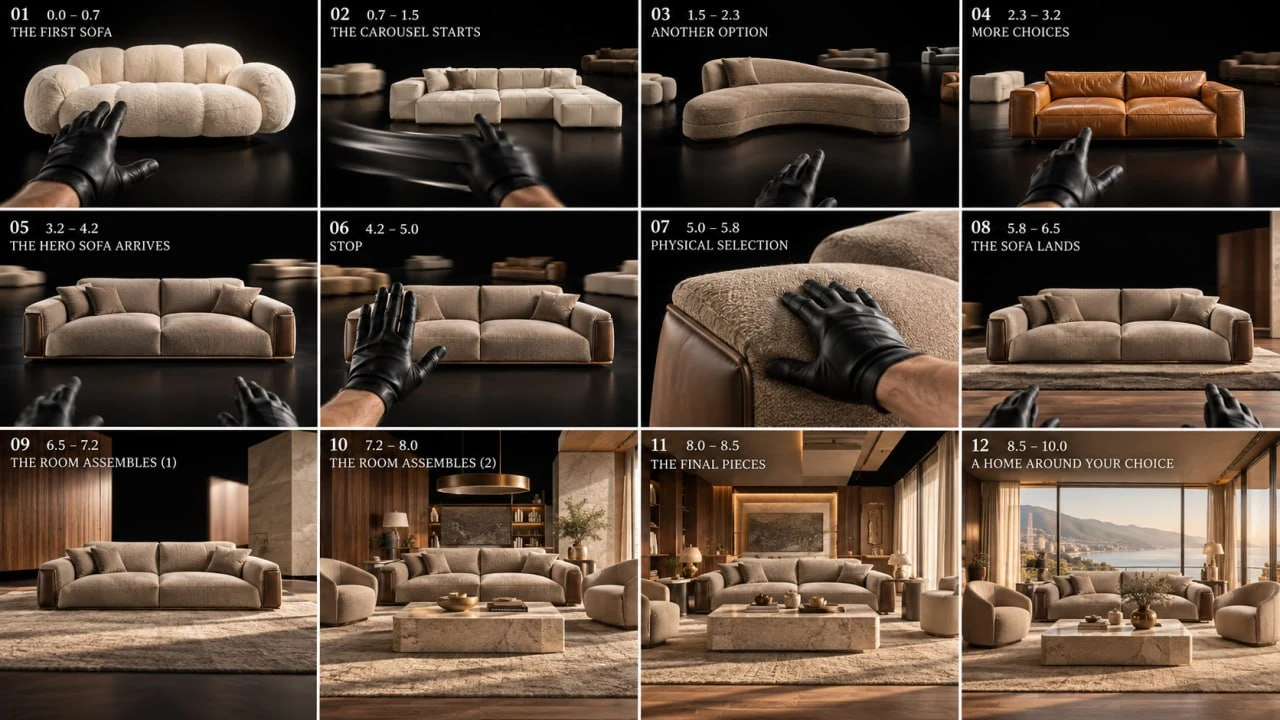
https://cdn.creativeclaw.co/examples-catalog/luxury-furniture-carousel-commercial-storyboard-v1.webp

Use Creative Claw for this storyboard-to-video workflow. Do not request a local copy of the storyboard. Pass the hosted Creative Claw URL directly to the relevant tool.

Hosted storyboard reference:
https://cdn.creativeclaw.co/examples-catalog/luxury-furniture-carousel-commercial-storyboard-v1.webp

First, show the user the storyboard reference and ask:
"Do you want to use this sofa storyboard as-is, or adapt it for your own product and story?"
Wait for the user's answer before generating anything.

If the user chooses to use the storyboard as-is:
1. Use the hosted storyboard URL as a reference image for video/gemini-omni-flash. Pass it in the ordered image_urls reference list as Image 1. This is a multi-panel storyboard, not a literal first frame, so use reference-guided video mode rather than treating it as image_url frame zero.
2. Generate one 10-second, 16:9 video with Gemini Omni. Preserve the storyboard's first-person male POV, 26–28mm lens, black studio, matte-black leather gloves, realistic physics, continuous camera language, furniture continuity, and final quiet-luxury room reveal.
3. Use the baseline direction below. Keep it faithful when the user chooses the original sofa concept. Set agentic_prompting to false when the field is supported because the prompt contains exact timing and reference constraints.

If the user wants to adapt the storyboard:
1. Ask what they want to change, including the product, room, visual story, colors, actions, and any important timing or camera preferences. If they provide product reference images, use all of them as visual references.
2. Use image/nano-banana-2 to create an updated storyboard before generating the video. Pass the hosted storyboard URL as image_url, making it Image 1. Pass the user's product reference images in extras.image_urls in order as Image 2 onward. Do not omit the storyboard. In the edit prompt, state that Image 1 is the base storyboard and Image 2 onward are the exact product references. Preserve the same storyboard format, panel order, timing structure, camera and composition logic, while replacing the sofa and related product details with the user's product and adapting the story to the user's request. Preserve product geometry, proportions, materials, colors, and logos from the product references. If no product image is supplied, use the user's description as the product brief. Set agentic_prompting to false when supported.
3. Show the updated storyboard to the user and ask for approval or requested changes. Do not generate the video until the storyboard is approved.
4. After approval, generate the video with video/gemini-omni-flash. Pass the approved storyboard as Image 1 in image_urls. Pass the product references after it when they help preserve product identity. Treat the storyboard as a visual reference, not as the literal first frame. Adapt the baseline direction below to the approved storyboard and the user's requested product and story. Preserve the approved product identity, shot order, realistic physics, 16:9 framing, 10-second duration, and single continuous feel. Set agentic_prompting to false when supported.

Baseline video direction, adapt the product nouns and story beats only when the user requests changes:
Create a 10-second ultra-photorealistic 16:9 luxury furniture commercial, one continuous first-person male POV, 26–28mm lens, black studio, matte-black leather gloves, realistic physics only. 0–0.8s: white-cream cloud sofa floats centered; hand swipes left. 0.8–1.6s: sofa rapidly orbits left as a warm ivory modular sofa arrives from right and stops center. 1.6–2.4s: another swipe replaces it with a curved latte boucle sofa. 2.4–3.2s: swipe brings in a warm caramel leather sofa. 3.2–4.2s: final taupe/mocha hero sofa arrives slowly, rotates frontal and stops with heavy inertia. 4.2–5.0s: open-palm STOP gesture freezes the carousel; other sofas disappear into distance. 5.0–5.8s: hand presses and slides across hero sofa armrest, realistic fabric compression. 5.8–6.6s: sofa lands; walnut floor slides beneath it and taupe rug unrolls. 6.6–8.5s: KEEP THE EXACT SAME HERO SOFA stationary while the luxury room physically assembles around it—walnut and travertine walls slide in, coffee table and latte chairs enter, shelving locks into place, pendant descends, curtains and decor move into position. 8.5–10s: panoramic window opens, warm daylight floods the completed quiet-luxury interior; slow dolly backward reveals the full room. Hero sofa remains 100% identical throughout. Real mass, inertia, friction and mechanical stops; no magic, morphing, teleportation, particles, smoke, UI, text, logos, people, cuts or camera-angle changes.